

PraiseTune is the app worship teams and church musicians use to manage lyrics, chords, collections and setlists in one place. You’ve probably written or fixed a song away from home, maybe on the bus or during a break, with no instrument nearby to check that the chord you typed is really the right one. With PraiseTune 1.2 you can listen to it right inside the app, played by a synthesized piano: no more guessing about what you wrote.
Listening to a chord as you write it
When you open the dialog to add or edit a chord, tap the Preview, the box at the bottom that shows the chord, and hear what you just typed right away, with the same transposition and the same bass note (for slash chords like C/G) shown in the preview.
Listening to a chord already written in the text
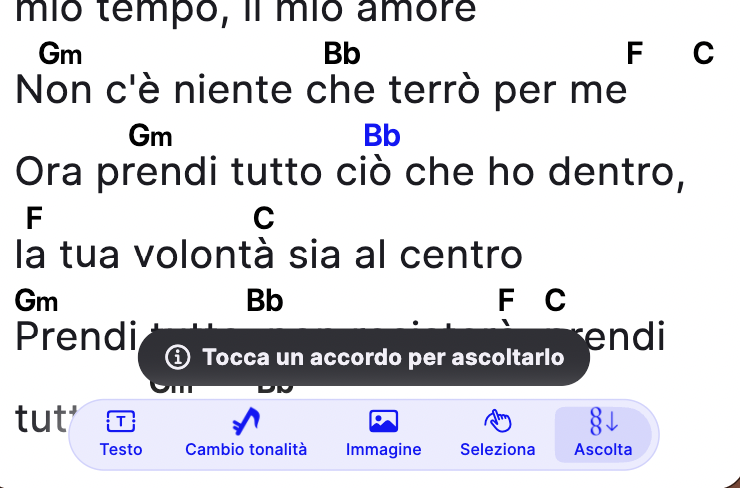
You don’t have to reopen every chord to check it one by one. In the editor’s toolbar, under “More”, you’ll find the “Listen” mode: turn it on and tap any chord in the text, whether it’s positioned above the syllables or written inline within the text, to hear it play.
Frequently asked questions
Do I need an internet connection? No, the sound is synthesized directly on the device.
Does the chord I hear account for transposition and capo? Yes, you hear exactly what you read in the preview, with the current transposition and the slash chord’s bass note, if there is one.
Is this a Free plan feature? Yes, it’s available regardless of plan.
All the 1.2 updates are summarized in PraiseTune 1.2: floating metronome and pad, link attachments, last song and chords you can hear. If you’re still setting up your repertoire from scratch, start with how to convert a PDF to ChordPro.
Download PraiseTune for free on App Store and Google Play.