

PraiseTune is the app worship teams and church musicians use to manage lyrics, chords, collections and setlists in one place. An ambient sound bed under a prayer, a moment of silence, or the transition between two songs is something many worship teams already use, usually with a dedicated keyboard or another app that has to be kept in sync by hand with whatever key you’re playing in. PraiseTune 1.2 introduces the pad: an ambient sound built into the app, which already knows the key of the song you’ve opened and follows along on its own when you change songs or transpose.
How to start it
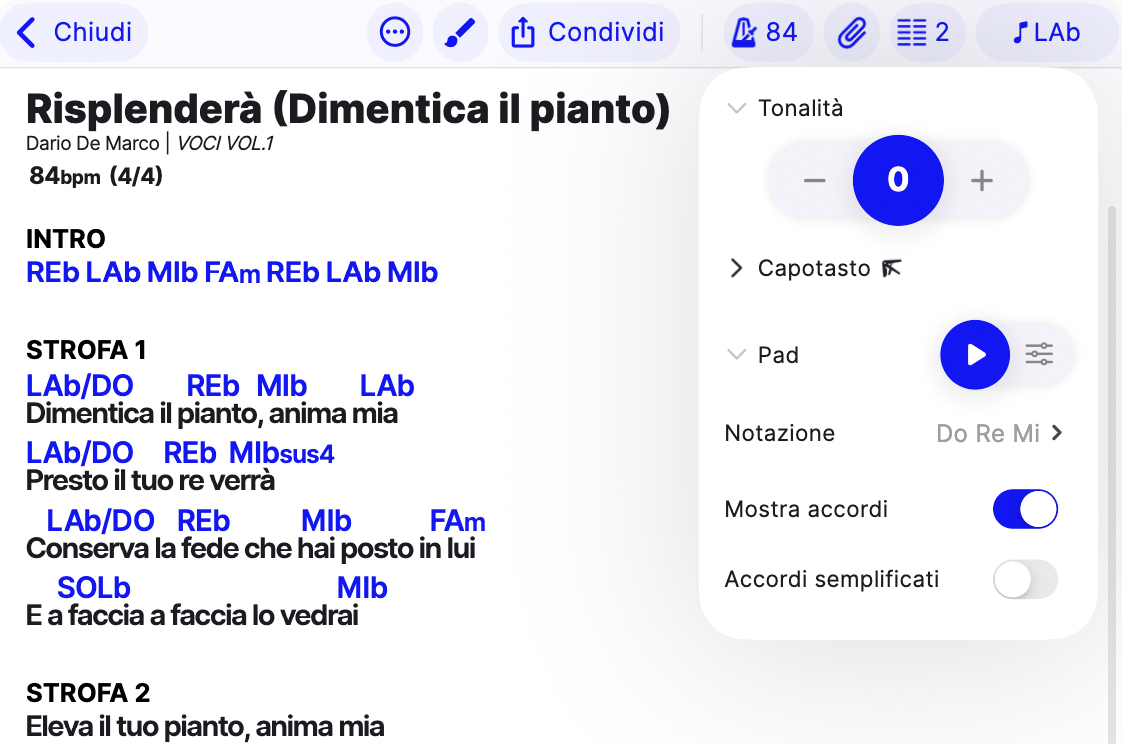
Open a song’s key settings (the key icon in the top bar) and scroll down to the Pad section: you’ll find the Play button and, by tapping the icon, volume and filter options. The pad starts right away in the key of the open song.
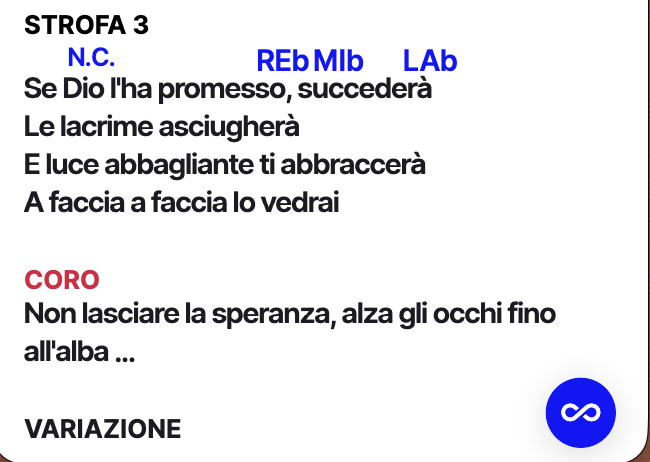
After the first start, a floating button also appears in the bottom right corner, reachable from any screen: tap the circle to see which key it’s playing and stop it, or leave it running while you browse other songs.
Key changes: automatic or manual
The pad has two ways to follow the key, chosen with the “Change key when you open a song” switch in the settings:
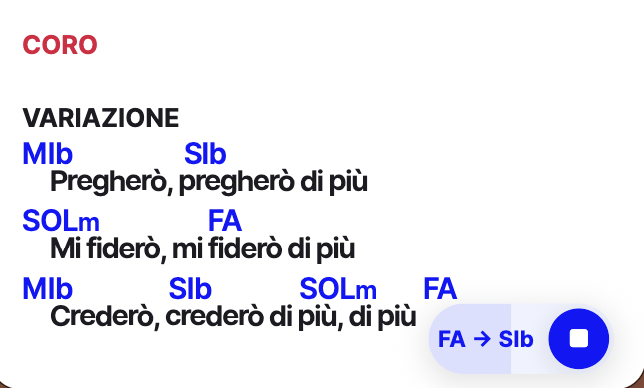
- Automatic (on by default): opening another song, or transposing the current one, the pad fades on its own from the old key to the new one. The floating button opens by itself to show you the change in progress (“C → D”) and closes once it’s done: it’s an announcement, there’s nothing to tap.
- Manual: the pad stays on the key it started with until you tap the “Change to [key]” button that appears in the pill. Useful if you don’t want the sound to change in the middle of a moment, only when you decide.
Volume and filters
From the Pad section in the settings you can adjust the volume and two frequency filters (low cut and high cut) to fit the tone to the room: more open and present, or warmer and further back in the mix. If you connect a keyboard or a MIDI controller, you can map these controls to a physical knob.
Frequently asked questions
Is the pad included in the Free plan? No, like the metronome it’s a paid-plan feature (Solo or Team).
If I close the song, does the pad stop? No. Like the metronome, it keeps running until you stop it or drag it away from the floating button: you can keep browsing other songs while the pad plays.
What kind of sound is the pad? A continuous ambient sound bed (“shimmer”), meant to sit under other sounds without covering them, not a piano chord or a rhythmic synth.
Can I choose when the key changes instead of letting it happen automatically? Yes, by turning off “Change key when you open a song”: the pad then waits for your tap before moving to the new key.
The pad shares its floating button with the metronome: how to use the metronome on PraiseTune. All the 1.2 updates are summarized in PraiseTune 1.2: floating metronome and pad, link attachments, last song and chords you can hear.
Download PraiseTune for free on App Store and Google Play.