

PraiseTune is the app worship teams and church musicians use to manage lyrics, chords, collections and setlists in one place. If your repertoire has grown over time, sooner or later you’ve found yourself needing to repeat the same operation on a lot of songs at once: deleting a batch of duplicates, duplicating shared songs so you can edit them freely, or handing an entire batch over to another team. Doing it one song at a time, with dozens of songs, is exactly the kind of repetitive work PraiseTune wants to take off your plate.
PraiseTune 1.1 brings multi-select for songs, with three actions available on your selection: duplicate, delete, share/copy to another team.
How to enter selection mode
In a collection’s song list, press and hold on a song (or use the dedicated selection icon) to turn on selection mode. From there, tap the other songs you’re interested in: a bar with the available actions for your selection appears at the top or bottom.
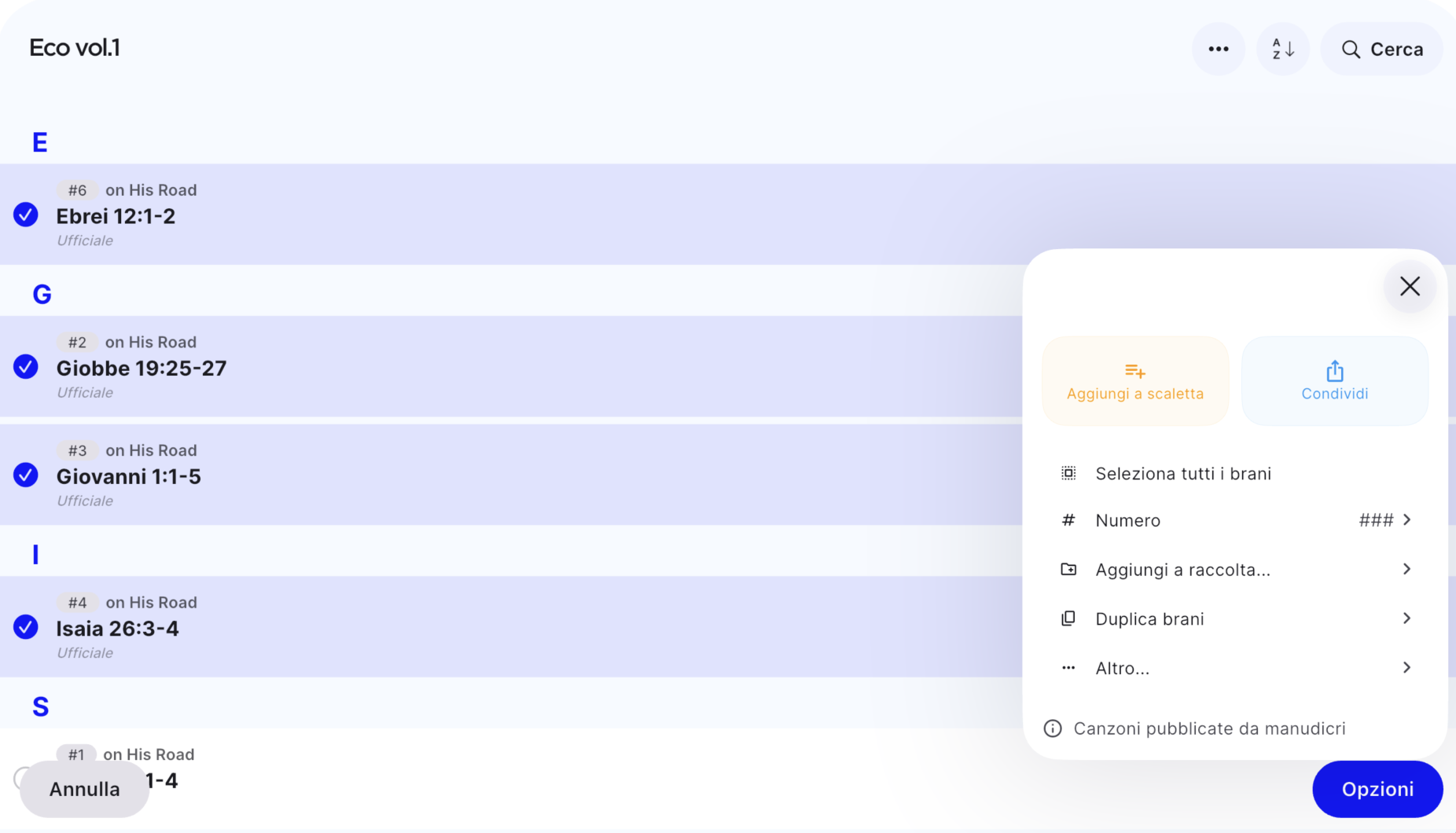
Duplicating multiple songs at once
Why it matters: it’s common to have access to songs shared by others (that you don’t own) and still want your own freely editable copy, without touching someone else’s original, maybe to adapt an arrangement for your group.
Select the songs you’re interested in and choose “Duplicate songs”. PraiseTune creates an independent copy of each one, owned by you, and groups them all together into a new collection inside “My Songs.”
A few useful details:
- If some of the selected songs haven’t been synced online yet, you’re asked to sync them before they can be duplicated.
- If you don’t have permission to copy one or more songs in the selection (because you don’t own them and lack the necessary permissions), those songs are automatically excluded: at the end you see how many were actually copied and how many weren’t.
- As with duplicating an entire collection, the limit per single operation is 1000 songs.
Deleting multiple songs at once
Why it matters: quickly cleaning up a repertoire full of wrong entries, duplicates or test songs, without opening each one just to delete it.
Select the songs to remove and choose “Delete songs”. PraiseTune warns you clearly before proceeding: deletion is permanent, and the songs disappear for everyone, including from the collections and setlists they’re part of, not just from the view where you selected them.
Here too, if you don’t have permission to delete one or more songs in the selection, those songs are left alone: the app tells you how many were deleted and how many weren’t, and why.
Sharing or copying songs with another team
Why it matters: bringing a group of songs into another team’s shared library (say, when two groups from the same church start working together more), without having to share them one by one.
From multi-select you can pick a destination team: the selected songs become visible to every member of that team (only for the songs you’re an admin of; the setting stays as it already was for the rest). It’s the same principle already seen for sharing an entire collection, applied to a free-form selection of songs.
Frequently asked questions
What happens to songs I don’t have permission to duplicate or delete? They’re automatically excluded from the operation: PraiseTune always shows you how many songs were actually duplicated or deleted and how many were left out, instead of blocking the whole operation or failing silently.
Do copies of songs duplicated in bulk stay linked to the originals? No: each copy is an independent song, owned by you. Editing it doesn’t change the original, and vice versa.
Can I undo a bulk deletion? No, it’s permanent. That’s why the app always shows an explicit warning with the count of songs involved before proceeding: read it carefully, especially with large selections.
Where do I find songs duplicated in bulk? In a new collection created automatically inside “My Songs,” so they stay grouped together and easy to find.
What’s the maximum number of songs I can select at once? 1000 per single operation, for both duplication and deletion: a safety ceiling, not a limit you’ll run into in normal use.
If instead you need to reorganize entire collections (not individual songs), also check out duplicate, move and share a collection on PraiseTune. For the rest of what’s new in this version, see PraiseTune 1.1: duplicate collections and songs, new menu, faster search.
Download PraiseTune for free on App Store and Google Play and manage your repertoire in bulk instead of song by song.