


PraiseTune is the app worship teams and church musicians use to manage lyrics, chords, collections and setlists in one place. Ever since PraiseTune introduced tab-based navigation (Team / Explore / Profile, covered in PraiseTune 1.0), the side menu for switching between teams had stayed a plain list: useful for picking a team, but nothing more. The problem is that the bottom tab bar isn’t always there, for example on narrower screens in certain views, leaving you with no obvious way back to Explore or your own profile.
With PraiseTune 1.1, the side menu becomes the app’s universal navigation wherever the tab bar isn’t there.
What it holds now
Besides the list of your teams, the menu now holds, from top to bottom:
- “My Songs”, pinned at the top as always
- “Explore”, right below it, previously reachable only from the tab bar
- The list of your teams, with “Create team” at the bottom
- A row with your profile, pinned at the bottom, which opens your account settings in a dedicated screen
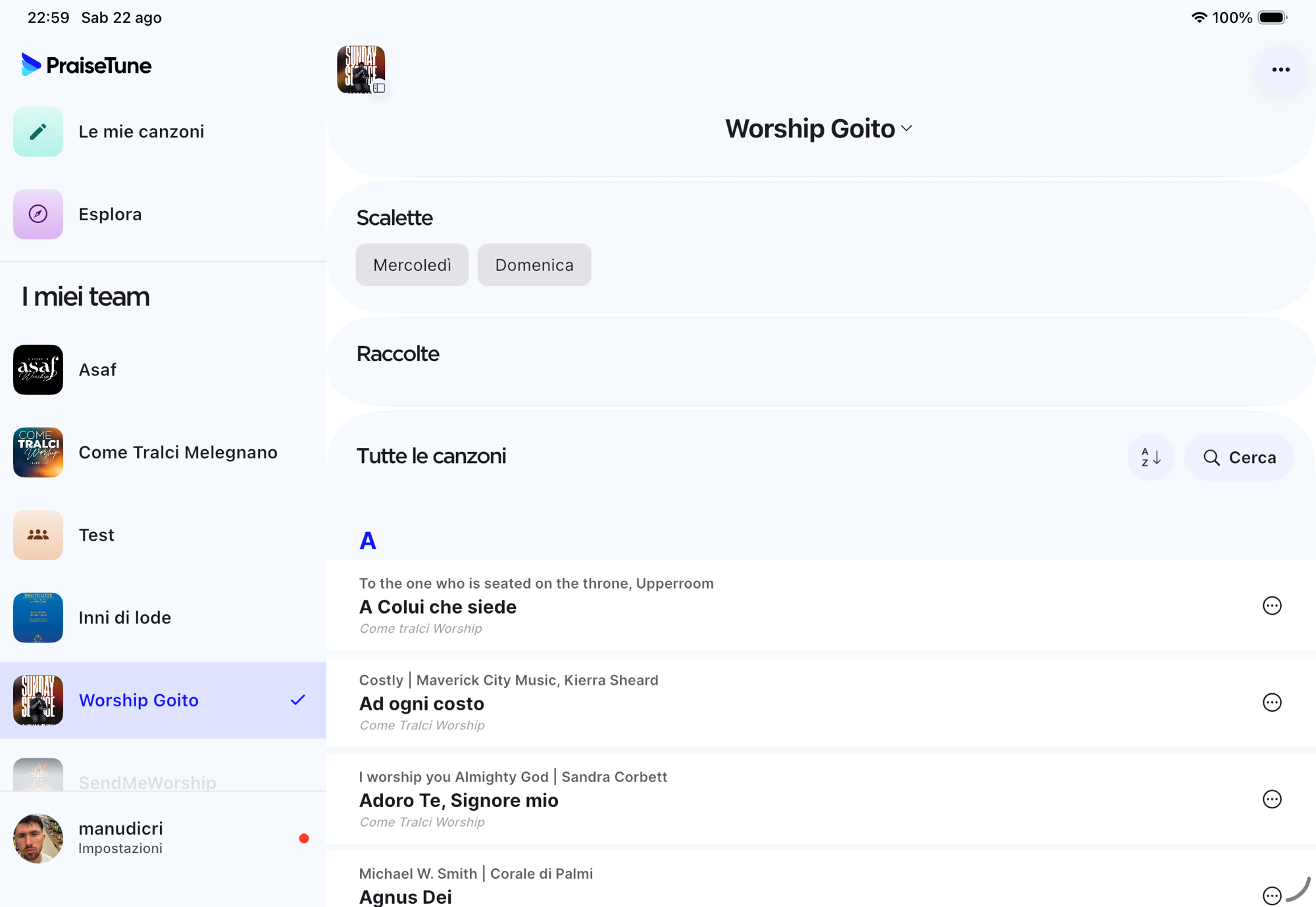
Without this change, fully closing the tab bar (as happens in certain views) would have left “Explore” and your profile unreachable except by swiping in from the edge to reopen the menu every time.
It behaves differently depending on the screen
On phone, the menu stays a classic drawer: it opens by dragging in from the left edge or tapping the dedicated button, and closes on its own as soon as you make a selection.
On tablet and desktop, with more room to work with, the menu becomes a fixed panel that sits alongside the content instead of covering it. In this case it stays open even after a choice: tapping the already-selected row again closes it, but switching between teams doesn’t, since on a wide screen it makes sense to keep it visible at all times.
When you select a team, its row moves toward the top of the list with a small smooth motion, instead of jumping to the top all at once.
The app remembers the last tab you had open
Before, every time you opened PraiseTune you always started from the same default tab. Now the app remembers the last tab you had open (Team, Explore, or Profile) and reopens it automatically next time, instead of always making you start from the same point.
“Create team” for people who haven’t signed in yet
If you tap “Create team” without having signed in, previously nothing useful would happen: there’s no account yet to attach the creation to. Now, in this case, the app shows a dedicated welcome screen (“Connect your group”) instead of a dialog that couldn’t work anyway. As soon as you sign in, that screen closes on its own and you land where you wanted to go.
A small reminder for your profile photo
On the profile row, if you haven’t uploaded a photo yet, a small indicator appears, the same kind of dot used for unread notifications, inviting you to add one. A minor detail, but a useful one for making you easier to recognize to other members of your team.
For the rest of what’s new in this version, see PraiseTune 1.1: duplicate collections and songs, new menu, faster search.
Download PraiseTune for free on App Store and Google Play and try the new navigation right away.